Give your DAW first call
Pick Logic, Ableton, Pro Tools, Cubase, Studio One, FL Studio, Reaper or any other app from the Prioritize menu, and everything else waits its turn.
Prioritise the app you need.
A menu bar app that sends Chrome, Dropbox and the rest of the background crowd to the back of the queue, so Logic, Ableton, Pro Tools or whatever app you choose gets the processor first.
I built it to keep my 2015 iMac making records.
Free 30-day beta. Works with any DAW, on Intel Macs running macOS 10.14.4 Mojave or later.
Prioritize is off. Chrome, Dropbox, Photos and Slack are competing with Logic Pro for the processor.
System Overload.
The audio engine was not able to process all required data in time. (-10011)
That's Logic's version, while Ableton, Pro Tools and the rest crackle, drop out or throw their own error. It always turns up mid-take, and the culprit is usually forty browser tabs and Dropbox syncing a bounce, all with an equal say on the processor. CPU Manager settles that argument in your session's favour.
It isn't a plugin, so it works with any DAW.
Pick Logic, Ableton, Pro Tools, Cubase, Studio One, FL Studio, Reaper or any other app from the Prioritize menu, and everything else waits its turn.
My personal favourite
Your DAW gets priority whenever it's the app in front, and lets go when you switch away.
Keep one for mixing, one for tracking and one for writing.
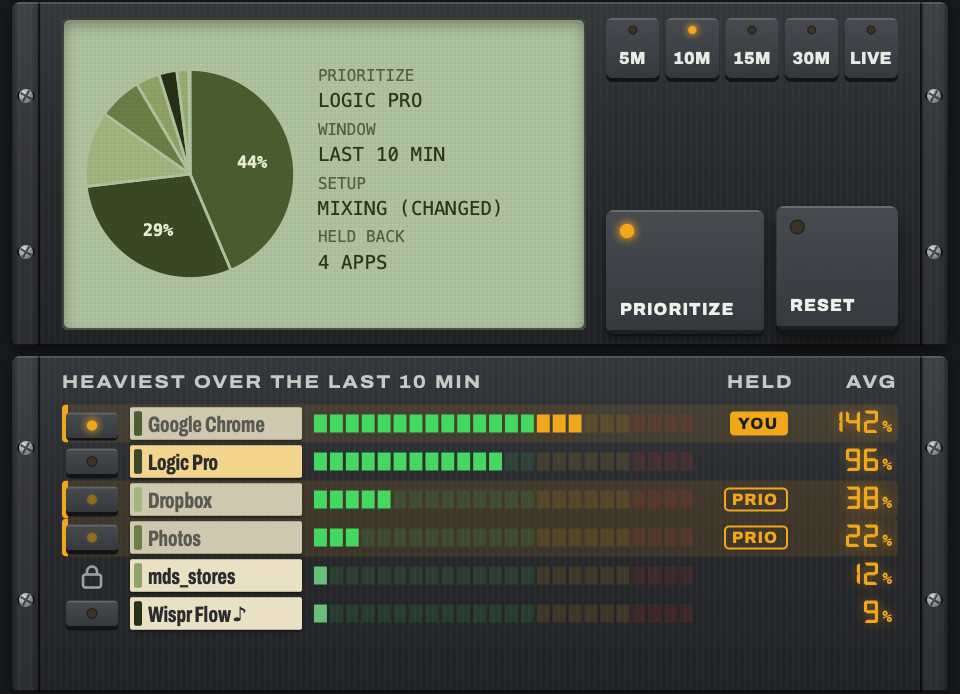
It only changes the order apps get the processor when your Mac is busy.
Join the free betaIt can't give your Mac more power than it has. Think of it like noise-cancelling headphones for your Mac: it blocks out the distractions so your processor can focus on what you want it to. If your Mac has completely run out of puff, it's probably time to get a new one.
Same song, same busy Mac, CPU Manager off and then on, twice over.
| CPU Manager off | CPU Manager on | |
|---|---|---|
| First test | 05 | 00 |
| Second test | 02 | 00 |
With it off, Logic threw five System Overloads in the first test and two in the second. With CPU Manager prioritising Logic it threw none, because Logic got about 7.5% more processor time and the background load's share dropped by about 70%.
That was one Mac and a real, heavy mix of mine against eight test processes maxing out the cores, far heavier than a normal day, so expect a smaller difference day to day. Even then there was a little jumpiness at the very end of the heaviest run.
A free answer to a $5,000 problem.
Anything else, email [email protected] and I'll get back to you.
No. CPU Manager isn't a plugin, so it works with any app you record in: Ableton Live, Pro Tools, Cubase, Studio One, FL Studio, Reaper and the rest. Pick whichever one you use from the Prioritize menu, or set it to Prioritize when open.
It won't add power. It decides who gets the power you already have, which on a busy Mac can be enough to stop the overloads. On my 2015 iMac it was the difference between five overloads and none (the test is above).
Not in your audio path. The parts of macOS that handle sound, plus your interface's control software, are permanently off limits, and CPU Manager also tries to spot other apps playing or recording sound and leave them alone. If you ever hear something, mark the app Never throttle and tell me, because that's a bug I want to fix.
Video calls and screen recordings are the exception. CPU Manager can't reliably tell a Zoom call or a recording of your session apart from any other background app, so while your DAW has priority their sound and picture can both get very glitchy. Before you start, right-click that app in CPU Manager's list and choose Never throttle this app.
Sign up with the form above. I pick testers for a good spread of Intel Macs, macOS versions and audio interfaces, then email you the download and your own tester code. The app runs for 30 days from when you first unlock it, and around day 14 and again near the end it asks you five quick questions. Answering those is the whole price of admission.
The beta copy stops working, and quitting it puts every app back exactly as it was, so nothing is left slowed down. When CPU Manager goes on sale, beta testers hear about it first.
The first release is for Intel Macs, because that's where I've built and tested it. An Apple Silicon version will follow once I've tested it properly on M-series machines.
You could, and if you're the sort of person who closes Chrome before every session, you might not need this at all. The rest of us have forty tabs open, three of them are lyric sheets, and one is a YouTube tutorial paused at the good bit.
It needs neither. CPU Manager never connects to the internet and never asks for your administrator password.